
Integrations
Connect heyhum with third-party services to extend functionality and automate workflows. Streamline your error tracking and development processes.
JIRA Integration
Create JIRA tickets directly from error logs with a single click. Automatically populate tickets with error details, stack traces, and session information.
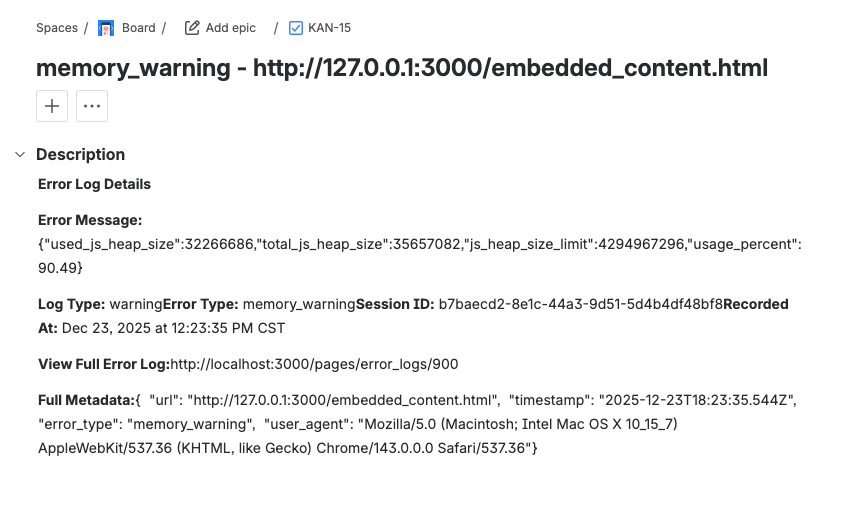
Key Features:
- One-Click Ticket Creation: Create JIRA tickets directly from error log detail pages
- Automatic Data Population: Error information, stack traces, and metadata are automatically included
- Formatted Descriptions: Tickets use JIRA's Atlassian Document Format for clean, readable content
- Direct Links: Access created tickets immediately with direct links
- Secure Authentication: Uses JIRA API tokens for secure, password-free authentication
How It Works
Configure your JIRA integration in your organization settings under Integrations. Once configured, you'll see a "Create JIRA Ticket" button on error log detail pages. Click the button to instantly create a ticket with all relevant error information.
Setup Requirements
- A JIRA account with access to the project where tickets should be created
- A JIRA API token (created in your JIRA account settings)
- The project key for your JIRA project
- Permission to create issues in the target JIRA project
Use Cases
- Streamline error tracking workflow by connecting errors directly to issue tracking
- Automatically create tickets for critical errors
- Maintain detailed error context in your issue tracking system
- Improve collaboration between development and QA teams
- Track error resolution progress in your existing project management tools